Product page counts
Show the daily view count near the product summary so shoppers see popularity before they add to basket.
Free WooCommerce plugin
Hot Products displays daily view counts on WooCommerce product pages and shop archives, adding simple social proof exactly where purchase decisions happen.
Simple signals
Install the plugin, enable the display options, or place the count manually with the Gutenberg block or Elementor widget.
Show the daily view count near the product summary so shoppers see popularity before they add to basket.
Add counts to shop and category listings, helping customers spot items that are attracting interest.
Counts reset each day so the display stays fresh and reflects what is happening in the store right now.
Add the Hot Products count inside block layouts, custom product content, or reusable WordPress patterns.
Drop the count into Elementor product templates and style the message from the widget controls.
Automatic placement, the block, and the widget all use the same renderer for consistent markup.
Why it helps
Customers often look for reassurance before choosing a product. A daily view count gives them a simple popularity cue without adding pop-ups, countdown timers, or aggressive sales messaging.
For store owners, product view counts also make browsing behaviour easier to understand. If a product is getting attention but not converting, it may need stronger imagery, clearer copy, a better price, or more prominent cross-sells.
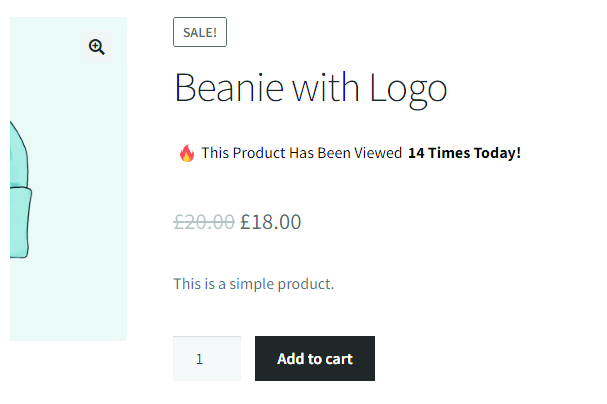
Product pages
The count sits directly on the product page and can be styled from the plugin settings to suit your store.

Archive pages
Enable archive counts to show interest levels across product grids without changing your catalogue workflow.
Setup
Hot Products is designed for store owners who want a focused product popularity display without a complicated analytics dashboard.
Search for Hot Products in the WordPress plugin directory or download it directly.
Turn on the product page display so view counts appear near the single product summary.
Optionally show daily views on shop, category, and archive grids for easier discovery.
Adjust the message, flame icon, text colour, and background colour from plugin settings.
Current release
Version 1.1.0 adds a Gutenberg block and Elementor widget, building on the compatibility and sanitisation improvements from the previous release.
FAQ
Useful details for store owners comparing WooCommerce product view counter plugins.
It tracks product page views for the current day and stores the count against each WooCommerce product.
Yes. The archive display option can show daily product views in product listings such as shop and category pages.
Yes. You can change the product page and archive text, including where the count appears in the message.
Version 1.0.9 is tested with WordPress 7.0 and WooCommerce 10.9.1, with escaping, sanitisation, and asset URL improvements.
Free download
Add daily product view counts to your WooCommerce store and keep the display simple, fast, and easy to manage.
Get the plugin